 Cineetap
Revolutionize Your
Editing Workflow
Edit smarter, not harder — with cutting-edge AI tools built right into Premiere Pro. Cut silence, remove backgrounds & objects, enhance audio and more.
No account needed · Works on Premiere Pro 2022+
Built for modern editors
Premier Choice for Your Video Editing
Most tools are 100% free. Pro unlocks the AI chat agent and media generation.
AI Cut
Automatically detects silence, cuts and disables dead-air clips on your timeline. Saves hours of trimming.
Remove BG & Objects
Cut out the subject or paint to erase any unwanted object — one-click background & object removal.
Enhance Audio
Studio-quality sound — compressor, limiter & vocal enhancer applied to your clips automatically.
Flow Motion (Ken Burns+)
Smooth cinematic zoom and pan keyframes for selected clips — pro camera movement in one click.
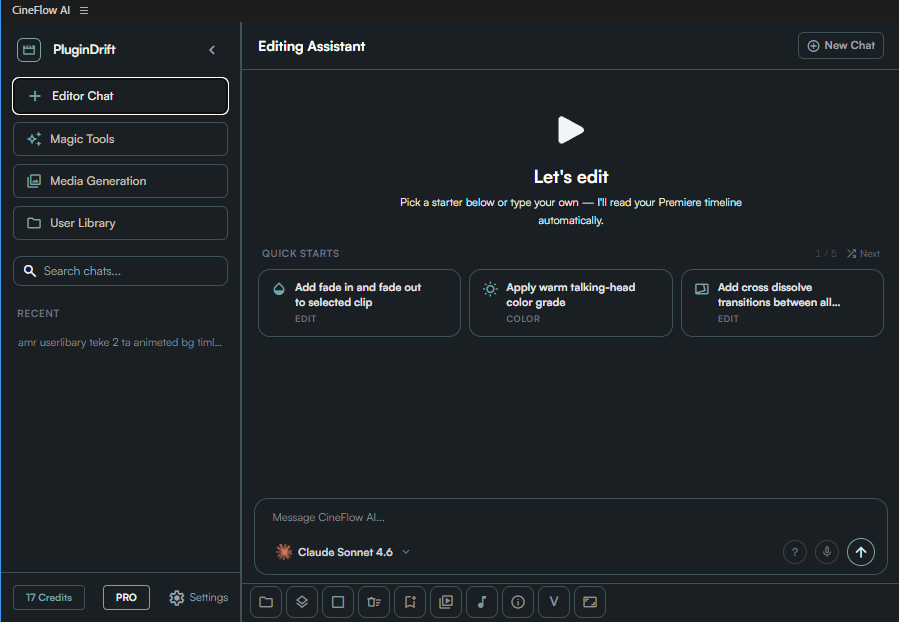
AI Editor Chat
Control your timeline with natural language. Powered by Claude, GPT & Gemini — it reads your project and edits for you.
Media Generation
Generate images, voiceovers & background music from text — auto-imported straight onto your timeline.
Everything You Need to Start — 100% Free
No account, no credit card. Install the plugin and these tools are yours instantly.
Free
$0 /foreverAutomate your everyday editing — completely free.
- AI Cut — silence removal
- Background Remove + Object Remove
- Enhance Audio & Essential Sound Fix
- Flow Motion (Ken Burns+)
- Resize Sequence & Solid Layer
- Free chat models (Gemma, Gemini Flash)
Pro & Studio
from $9 /moUnlock the full AI agent and creative generation.
- AI Editor Chat (Claude · GPT · Gemini)
- Auto Caption & Transcription
- MultiFrame Export
- Beat Marker & Keyframe Smooth
- AI Media Generation (image · voice · music)
- Priority email support
Talk to Your Timeline
Editor Chat lets you control Premiere Pro in plain language. It reads your timeline, understands your project, and runs complex edits through conversation — switch between Claude, GPT and Gemini anytime.
See all tools →Generate Images, Voice & Music
Create production-ready assets without leaving Premiere. Generate images, AI voiceovers and background music from a text prompt — all auto-imported straight onto your timeline.
Unlock with Pro →Up and Running in 3 Steps
Install the plugin
Download the free .ZXP and install it into Adobe Premiere Pro — no account required.
Open Cineetap
Find Cineetap in your Window → Extensions menu. It reads your timeline automatically.
Edit with one click
Cut silence, remove backgrounds, enhance audio — or just ask the AI chat agent to do it.
Simple, Transparent Pricing
Start 100% free. Upgrade for the AI chat agent & media generation whenever you're ready.
Everything to automate your everyday editing.
- AI Cut (silence removal)
- Background & Object Remove
- Enhance Audio & Sound Fix
- Flow Motion & layer tools
- Free chat models
The full AI editing agent for serious creators.
- Everything in Free
- AI Editor Chat (Pro models)
- Auto Caption & Transcription
- MultiFrame Export · Beat Marker
- Priority email support
Maximum power — adds AI media generation.
- Everything in Pro
- AI Image Generation
- AI Voiceover (TTS)
- AI Music Generation
- Highest usage limits
Secure payments by Paddle, our Merchant of Record · USD · Cancel anytime
Frequently Asked Questions
Yes. The core tools — AI Cut, background & object removal, audio enhancement, Flow Motion and more — are free forever, with no account required. Pro and Studio only unlock the AI chat agent and media generation.
Cineetap works with Adobe Premiere Pro 2022 and newer on Windows and macOS. Install the free .ZXP and open it from Window → Extensions.
All payments are securely processed by Paddle, our Merchant of Record. You can cancel your subscription anytime, and we offer a 14-day money-back guarantee.
No. Your project files and media are processed locally on your machine. Only the specific content you send to a Pro AI feature is transmitted to the relevant AI provider.
Email us anytime at support@cineetap.com — Pro users get priority responses.
Start Editing Smarter Today
Download Cineetap free and bring AI into your Premiere Pro workflow in minutes.